Defeating the Machine Account requirement for SCCM Client Push Installation from Linux
During recent engagements, we noticed that when we wanted to invoke SCCM Client Push Install, using tools such as sccmhunter that we were limited by the machine account requirement. This blog introduces a new approach to circumvent this limitation by using cross-protocol relaying.
Sooo… what is SCCM Client Push Installation?
We will start with a short introduction of what Client Push Installation is, we will not do a deep dive into SCCM itself, as there are plenty of resources available that already cover SCCM in detail. Microsoft has renamed SCCM to MECM but we will continue using the term SCCM, as it remains more commonly used.
System Center Configuration Manager (SCCM), also known as the Misconfiguration Manager (pun intended), provides administrators with a way to manage software and updates on devices. It is essentially the predecessor of Microsoft Intune, or the on-premises equivalent of Intune. To manage devices using SCCM, the client software needs to be installed on each device. A mechanism called SCCM Client Push Installation is commonly used to install this software automatically.
Client Push Installation deploys the client software by connecting to the device's ADMIN$ share and copying the necessary installation files. After that, the software is installed using ccmsetup.exe. By default, the connection to the share will occur over SMB, but if the WebClient service is enabled on the site server, HTTP authentication may also be used. By default, the machine account of the SCCM server is used to connect to the ADMIN$ share. However, if a Client Push Installation Account is configured, that account will be used instead. If this account fails, SCCM will attempt to use the other configured accounts in sequence, and finally fall back to the machine account. Effectively making this a round-robin approach.
This whole process of installing the client software can be abused in certain scenario's. If the SCCM Site is configured for automatic site assignment for a boundary group, automatic site-wide client push installation, and fallback to NTLM is enabled.
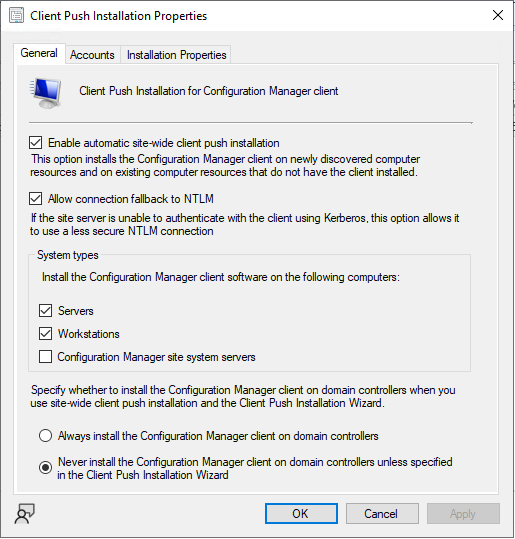
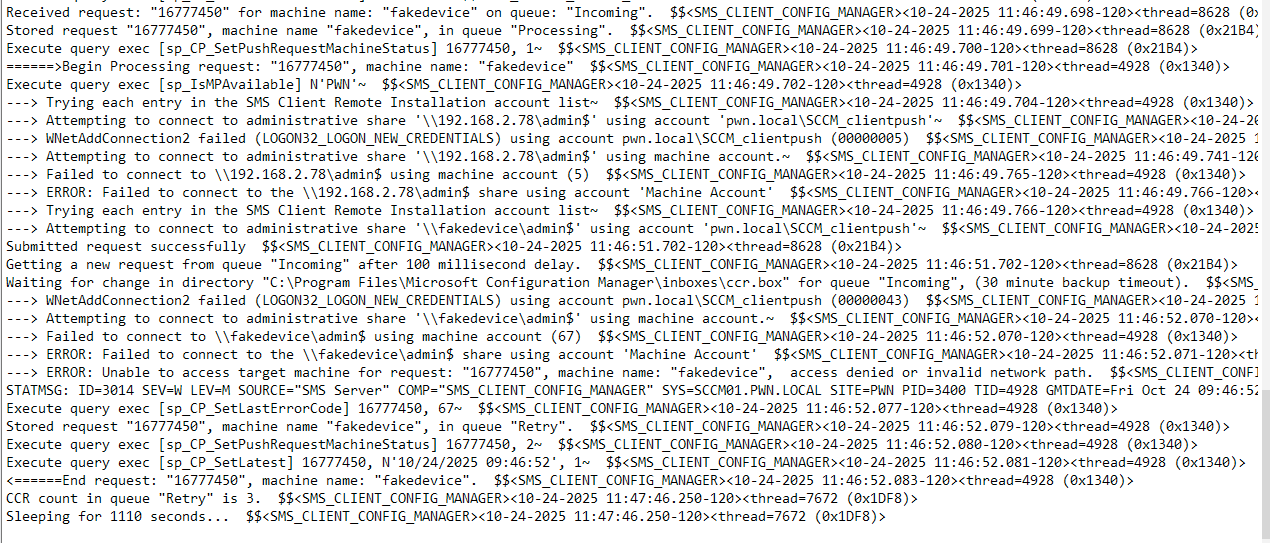
To abuse this configuration, we register a fake device and supplement it with device properties. By doing so, we can trick the Client Push Installation into attempting to install the client software on our system. If we setup a listener, we will receive an incoming SMB connection. The Client Push account is interesting because it needs at least local administrator permissions to access the ADMIN$ share. However in practice we have seen that the account usually has higher privileges than required such as the Domain Admins group for convenience.
Device registration
In order to register a fake device, we first we need to understand how a device is being registered in SCCM. When analyzing the behavior of currently existing tools such as sccmwtf and SharpSCCM, we see that it simply sends an HTTP request to the SCCM server.

The HTTP requests consist of two parts: an XML-encoded header and an XML-encoded body, both sent in a multipart/mixed HTTP request. The header is UTF-16 encoded, and contains information such as the target address, target host and target endpoint. The body of the request is zlib compressed and contains the Discovery Properties such as NetBIOS name, IP address and a self-signed certificate with the 1.3.6.1.4.1.311.101.2 and 1.3.6.1.4.1.311.101 EKU OID's which is a a self-signed SMS Signing Certificate.
After the device is registered, a Data Discovery Record (DDR) message is sent to indicate that the client is not yet installed on the system. The DDR is essentially a message that allows the management point to maintain an up-to-date view of machines, including their hardware, operating system information, and client installation status. By sending a DDR that indicates that the client is not yet installed, we can signal to the site server that this is a new device, and is a candidate for Client Push installation. To process these requests, SCCM uses queues. By sending a valid DDR request, the device will be placed in the "incoming" queue, meaning the installation will be performed almost instantly.
When an invalid DDR request is sent, the device will be placed in the "retry" queue. This queue will also attempt to install the client software. However depending on the state that the queue is in, it can have significant wait times of up to an hour before the installation is invoked.
The problem at hand
As already explained before the issue at hand is that when we want to abuse SCCM Client Push installation from Linux, the attack has one requirement: access to a machine account (doesn’t need to corresponds to the client we want to register). The reason for this requirement is in order to abuse the “Enable automatic site-wide client push installation”, the fake device needs to be in an “approved” state.
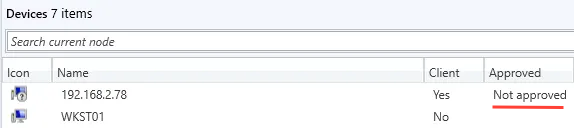
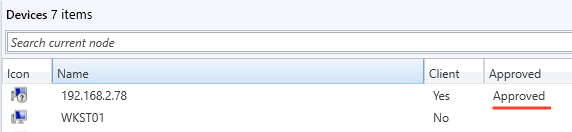
In most scenarios this limitation is not a problem. Simply create a new machine account using addcomputer.py and then use it with sccmhunter. The issue occurs in situations where creating a machine account is not possible because ms-DS-MachineAccountQuota is set to 0 or the permissions have been removed from the Authenticated Users group. We have encountered this scenario several times during engagements where common misconfigurations, such as MAQ had already been addressed by previous pentests but SCCM remained untested. This is unfortunate, as SCCM holds significant attack potential with tons of easily made misconfigurations. One might even argue that SCCM is the new ADCS, although it is not as widely deployed.

Cross-protocol relaying and a hippopotamus enters the chat...
To defeat this restriction, we can utilize cross-protocol relaying. First we can coerce authentication from a domain-joined machine using PetitPotam, which will result in incoming SMB authentication. Since SMB can be relayed to HTTP, we can relay this authentication to the SCCM HTTP endpoint to register a fake device. By using this approach, the device will be put in an approved state since the authentication of the machine account we coerced will be used. After the device has been registered, we send a DDR request indicating that the client software is not yet installed and include the IP address where it should be installed, which in this case is our own IP address.
Below is an image for reference for cross-protocol relaying:
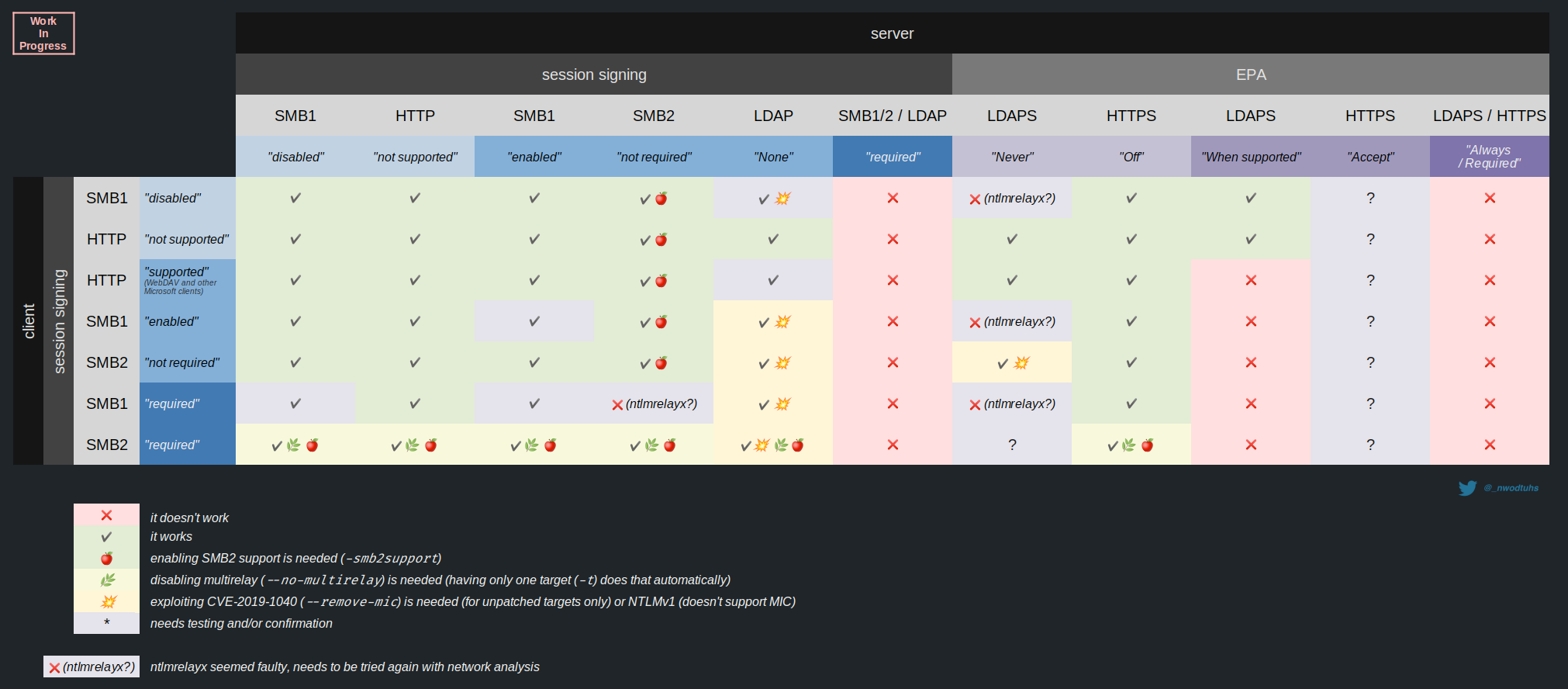
To accomplish this, we initially wanted to just use the ntlmrelayx -socks option to create an authenticated session for a machine account by coercing a device. Then we would use that session with sccmhunter to perform the rest of the attack. However this required some modifications in sccmhunter and eventually decided to take a different approach and add this feature inside of ntlmrelayx to simplify the attack.
Below is a flowchart to display the steps in the attack required:
Demo
The video below shows a demonstration of the implementation within ntlmrelayx, including coercing authentication from a domain-joined machine and relaying it to register a fake device in SCCM. Finally authentication from the SCCM Client Push account and the machine account were captured. The pull request for this implementation can be found here.
Reusing the fake device to obtain even more credentials
The tricky part about SCCM Client Push Installation is that it is difficult to determine whether the configuration is vulnerable. If the attack is not successful, it may still be possible to obtain additional credentials such as the NAA or task sequence accounts. When the relay succeeds and a fake device is registered, Impacket creates a loot directory containing the device GUID, keys, and certificates. These can be reused with tools such as SCCMSecrets to dump credentials:
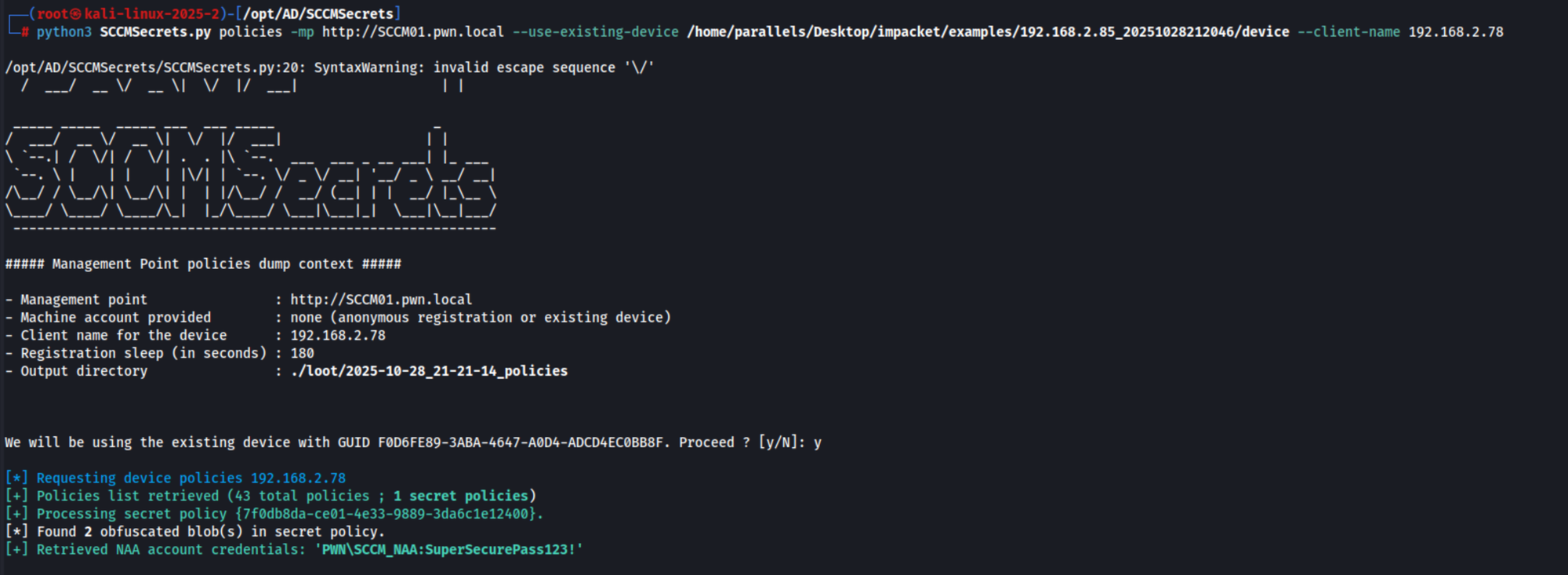
The output reveals that, by reusing the generated device, we were able to obtain the SCCM Network Access Account (NAA).
Defense/mitigation
- To prevent this attack, the best options is to avoid using Client Push Installation, and instead use alternatives such as Group Policy , Software update base or manual installation. Below is what Microsoft says about the client push installation method:
- Disable Automatic Site-Wide Client Push Installation
- Disable Allow Connection to Fallback to NTLM
References
System Center Configuration Manager
Security and privacy for Configuration Manager clients
sccmwtf
SharpSCCM
PetitPotam
Impacket
The Hacker Recipes
Impacket Pull Request
